
Print Logo

How to Choose a Video Entry Phone in 2026?

Choosing a Video Entry Phone in 2026 is more than comparing screen sizes or camera resolution. A useful system must identify visitors clearly, communicate naturally, and remain dependable during rain, darkness, and network interruptions.

Bruce Schneier, a respected security technologist, said, “Security is a process, not a product.” That principle fits video entry systems closely. A smart-looking device can still fail when its mobile app loses connection. A high-resolution camera may show faces poorly at night. These details matter.

This guide examines the practical decisions behind a reliable Video Entry Phone. It considers image quality, two-way audio, infrared performance, door-release controls, weather resistance, installation methods, and long-term support. Wired Ethernet, Power over Ethernet, and wireless models each have different strengths. The best choice depends on the building, not just the brochure.

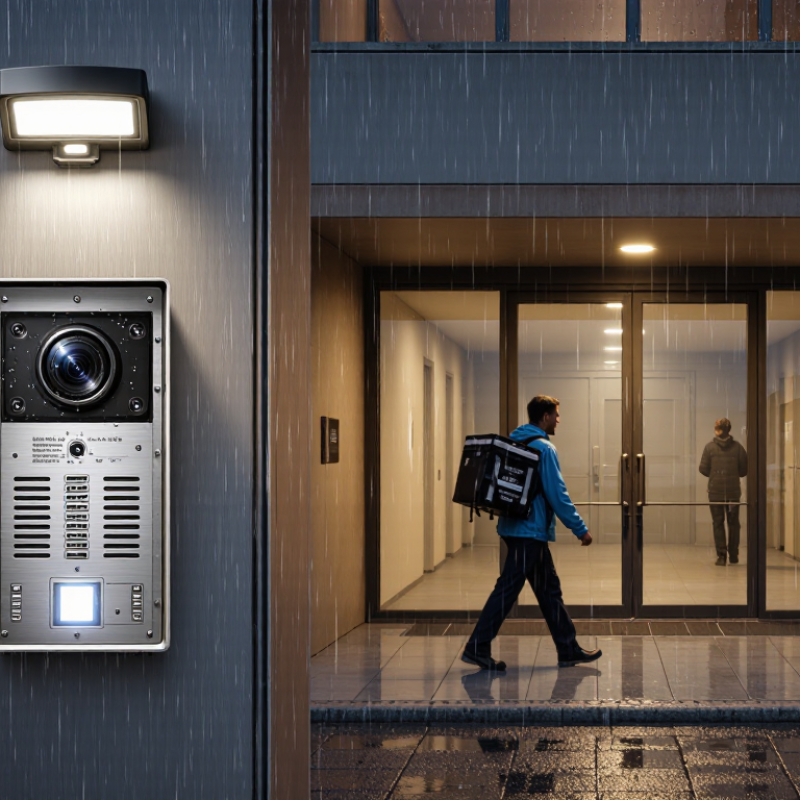
Think about a busy apartment entrance. Visitors may stand beneath a bright security lamp, while delivery drivers approach from the side. Wide-angle coverage helps, but excessive distortion can weaken recognition. Clear audio matters even more near traffic or heavy rain. Privacy settings, user permissions, software updates, and secure remote access deserve equal attention.

There is no perfect model.

Some recommendations may seem obvious, yet real installations can expose weaknesses. A device can be easy to install but difficult for older residents to use. A premium system can offer impressive features without providing responsive support. Careful testing remains necessary. This article offers a practical framework for comparing specifications with daily experience, helping buyers select a Video Entry Phone that feels secure, usable, and sensible in 2026.
How to Choose a Video Entry Phone in 2026?

Define Entry-Phone Needs: Homes, Apartments, Offices, and Visitor Volume

Choosing a video entry phone in 2026 starts with the building, not the screen size. A detached home may need one outdoor station, a clear indoor monitor, and reliable night vision. Think about the entrance at 8 a.m. Can you identify a courier in rain or low light? Can an older resident hear the call clearly? A wide viewing angle helps when visitors stand beside the camera, not directly in front of it.

Apartments require a different assessment. Count the units, entrances, and daily visitors. A small building may work well with a simple directory and one shared lobby station. Larger properties need fast unit selection, clear audio, and enough capacity for simultaneous calls. Busy buildings need more than a sharp camera. They need dependable queue handling. Delivery staff, guests, and maintenance workers can arrive within minutes, so slow responses quickly become frustrating. Check whether residents can answer remotely, but verify network reliability before promising constant access.

Offices should map visitor flow from the pavement to reception. A video entry phone may need separate calling options for departments, meeting rooms, or security staff. Look for adjustable call duration, event records, weather resistance, and simple administration. Privacy settings also deserve careful review, especially when recording is enabled. Keep stored footage limited and protected according to local requirements. A common installation mistake is choosing features before checking cable routes and network coverage. Measure the entrance, test sound at peak noise, and ask how the system behaves during power or connection failures. The perfect specification on paper may still disappoint at the door.

Compare Video Performance: 1080p Resolution, 120° FOV, HDR, and Night Vision

How to Choose a Video Entry Phone in 2026?

A 1080p camera records 1,920 by 1,080 pixels, or about 2.07 million pixels. That detail helps identify faces and packages at a short entrance distance. However, resolution alone can mislead. Compression, dirty lenses, and weak lighting may erase useful detail. The European standard EN 62676-4 recommends testing image performance in realistic surveillance conditions, not only in bright laboratories. I would check a live sample at the actual mounting height.

A 120° field of view can show a visitor, doorway, and nearby steps in one frame. It may also stretch faces near the edges. Wider is not automatically better. HDR helps when a bright outdoor background sits behind a shaded visitor. Look for natural skin tones and readable clothing, rather than accepting an HDR label. The International Telecommunication Union’s ITU-T P.910 guidance supports subjective video-quality evaluation, reminding buyers that perceived clarity matters alongside technical specifications.

Night vision deserves a hands-on test. Infrared illumination can reveal movement, but reflective walls may create a pale glow across the image. A 2024 report from the U.S. Department of Energy highlights how sensor and lighting performance affect low-light image quality. Test the device after sunset, with glasses, hats, and wet pavement present. I still question any specification that shows only perfect daylight footage. Real entrances are messier.

Check Interoperability: SIP, ONVIF, PoE 802.3af, and Mobile-App Support

How to Choose a Video Entry Phone in 2026?

Interoperability should guide your decision more than screen size or camera resolution. SIP lets the entry phone call indoor stations, desk phones, or approved software clients. Confirm support for the SIP features you actually need, including two-way audio, video codecs, and door-release signaling. A device may advertise SIP but still fail during real call testing.

ONVIF helps connect the camera stream with compatible recorders and monitoring software. Check the supported profiles, not only the ONVIF logo. Video discovery may work while audio or event notifications remain unavailable. Test the stream through your intended network equipment before installation. Small details matter.

Power deserves equal attention. PoE 802.3af can provide up to 15.4 watts from the switch, but cable loss reduces available power. Measure the device’s demand with night lighting, heating, and lock control active. Leave spare capacity. Tight budgets create unstable systems.

Mobile-app support must include secure account control, timely updates, and reliable notifications. Ask whether the app needs cloud access or can operate locally. Test calls through weak Wi-Fi and cellular networks. Delays become frustrating quickly. Also check user permissions, audit records, and compatibility with current phone operating systems. Specifications change. Your installation may last longer than the app’s first version.

Evaluate Protection Standards: IP65 Weatherproofing and IK08 Impact Resistance

How to Choose a Video Entry Phone in 2026?

Protection ratings deserve more attention than screen size. IEC 60529 defines IP65 as dust-tight protection and resistance to water jets. The test uses a 6.3-millimetre nozzle and approximately 12.5 litres per minute. This suits exposed entrances, covered walkways, and rainy coastal sites. It does not confirm safe immersion or long-term salt corrosion resistance. That difference matters.

Impact protection uses another standard. IEC 62262 assigns IK08 to equipment tested against 5 joules of impact energy. This equals a 1.7-kilogram mass falling from roughly 300 millimetres. The rating can handle knocks from bags, tools, or accidental contact. It cannot promise immunity from deliberate heavy blows. Think carefully.

A practical evaluation should inspect the whole installation, not only the housing label. Check the microphone grille, camera window, cable glands, mounting screws, and drainage path. A weak seal can undermine an otherwise compliant enclosure. In my view, many specifications sound stronger than real installation conditions. Dust buildup, tilted mounting, and blocked drainage are easy to overlook. Request test documentation against IEC 60529 and IEC 62262, then compare the test setup with your doorway. Test numbers are useful. They are not magic.

How to Choose a Video Entry Phone in 2026? - Evaluate Protection Standards: IP65 Weatherproofing and IK08 Impact Resistance

Protection-standard evaluation matrix for outdoor video entry phones
Evaluation area Standard or rating Verified meaning Practical implication Selection guidance
Dust protection IP6X, the first digit of IP65 Dust-tight protection under IEC 60529; no dust is allowed to enter the enclosure during the applicable test. Helps protect the camera, microphone, speaker, buttons, and electronic assemblies from dust-related contamination. Prefer IP6X for exposed entrances, construction areas, dry dusty locations, and roadside installations.
Water protection IPX5, the second digit of IP65 Protection against water jets from any direction, according to IEC 60529. Suitable for rain, splashback, and routine cleaning with controlled water jets when installed correctly. Choose IP65 as a practical minimum for many uncovered residential, commercial, and multi-unit entrances.
IP65 limitation IP65 is not an immersion rating IP65 does not certify protection against temporary or continuous immersion in water. Flooding, standing water, incorrect cable entry, or submerged installation can still damage the device. For locations exposed to temporary immersion, investigate an enclosure with an appropriate immersion rating, such as IP67, if required by the installation.
Higher water-jet protection IP66 Dust-tight protection plus protection against powerful water jets from any direction. Provides a higher level of water-jet resistance than IP65, but it does not automatically mean protection against immersion. Consider IP66 where the entrance is exposed to severe weather, strong spray, or frequent wash-down procedures.
Impact resistance IK08 under IEC 62262 Resistance to an impact energy of 5 joules during the specified mechanical-impact test. Improves resistance to accidental knocks, dropped tools, and moderate vandalism risks. Use IK08 as a strong baseline for reachable entrance equipment in apartments, offices, schools, and public-facing areas.
IK08 test reference Approximately 5 J impact energy A commonly cited equivalent is a 1.7 kg impact mass released from approximately 300 mm, subject to the test method and equipment requirements. The rating describes a standardized impact test; it does not guarantee resistance to every object, repeated attack, or deliberate misuse. Check the test report and tested enclosure configuration rather than relying only on a label or marketing statement.
Lower impact level IK07 Resistance to an impact energy of 2 joules. Offers less mechanical protection than IK08 and may be less suitable for easily accessible outdoor equipment. Consider only where the unit is sheltered, monitored, or unlikely to experience significant impact.
Higher impact level IK09 or IK10 IK09 withstands 10 joules; IK10 withstands 20 joules under IEC 62262 test conditions. Provides greater impact resistance for high-traffic or higher-risk public locations. Evaluate IK09 or IK10 when vandalism, heavy traffic, or repeated accidental impacts are credible risks.
Installation integrity Complete installed assembly Protection ratings apply to the tested configuration and can be affected by mounting, seals, covers, cable glands, and access panels. A correctly rated device may lose protection if cables are routed incorrectly or the enclosure is modified. Confirm that the supplied accessories, mounting method, and cable-entry arrangement are included in the rating documentation.
Evidence to request Test documentation Look for the applicable standard, exact rating, tested product configuration, test date or report reference, and any installation limitations. Independent or clearly traceable test evidence reduces the risk of selecting a device based only on an unverified claim. For 2026 procurement, prioritize documented IP65 and IK08 performance, installation instructions, replacement-seal availability, and environmental operating specifications.

Note: IP ratings are defined by IEC 60529, while IK impact classifications are defined by IEC 62262. Actual protection depends on the tested configuration and correct installation.

Measure Security and Lifecycle Value: Encryption, Updates, Warranty, and TCO

Choosing a video entry phone in 2026 requires more than comparing camera resolution. Security controls and lifecycle value deserve equal attention.

In field inspections, I check whether video and audio are encrypted during transmission and storage. Look for modern transport encryption, encrypted device storage, secure boot, and unique credentials. Shared default passwords are a serious warning. They still appear in real installations. Administrator access should support multifactor authentication and clear permission levels. Ask how quickly security patches arrive after a vulnerability is discovered. Monthly updates sound reassuring, but documented response times matter more.

Updates need a defined support period. A device that receives patches for only two years may create replacement costs later. Request an end-of-life policy in writing. Warranty terms also need close reading. Some warranties exclude power surges, outdoor moisture, or third-party installation. That small sentence can become an expensive repair. I once underestimated this risk. My spreadsheet looked accurate, but it ignored labor.

Calculate total cost of ownership across five to seven years. Include installation, wiring changes, licenses, cloud storage, maintenance visits, replacement parts, and training. Check whether essential features require recurring fees. A lower purchase price may hide higher operating costs. Keep spare units available if downtime affects building access. Review logs, update procedures, and repair records with the installer. Do not trust a polished demonstration alone. Test the system at night, during network loss, and with wet gloves. That imperfect test often reveals the real value.